
Which transport choice will actually make your live sports look crisp and cut buffering on game night?
You need a clear, plain-English roadmap that explains how transport-layer choices shape picture quality, startup time, and stability. This intro shows why reliability often means ordered delivery and retransmits, while speed favors less overhead and lower delay.
The short version: some protocols add latency but avoid glitches, and others favor real‑time delivery at the cost of occasional artifacts. You’ll learn how common streaming stacks behave today — from HTTP-based HLS and DASH to WebRTC and modern low-latency options — and which fits your devices and network.
By the end, you’ll see where trade-offs show up on screen and why providers like GetMaxTV can deliver 19,000+ live channels and 97,000+ VOD for $6.95/month with wide device support, instant activation, and 24/7 help so you can pick the best setup for your needs.
Key Takeaways
- You’ll get a simple map of how transport affects video quality and startup time.
- Reliability favors ordered delivery; speed favors minimal overhead for live feeds.
- Common stacks (HLS, WebRTC, SRT) show where latency or artifacts appear.
- Match protocol choice to your viewing habits, devices, and network reality.
- GetMaxTV offers a low-risk way to try a full channel lineup across devices.
Streaming fundamentals: how transport protocols shape IPTV quality in 2025
Think of the transport layer as the traffic manager for every video you watch. It sits beneath streaming systems and decides how packets move across your home router and the internet. That choice directly affects buffering, startup time, and perceived quality on your devices.
What the transport layer does for live feeds and VOD
What “transport layer” means for live video, VOD, and device playback
The transport layer handles order, loss recovery, and delivery speed. Some methods enforce strict ordering and retransmit missing data. Others skip retransmits to keep delay low. Those differences change whether a live goal appears instantly or after a short freeze.
Speed, reliability, and latency: the trade-offs that drive viewer experience
You’ll see a simple trade-off: higher reliability often increases latency; lower latency risks small artifacts. HTTP-based streaming for VOD typically rides on reliable connections with retransmits. Real-time paths use lightweight delivery to cut delay.
- Ordered delivery and retransmission boost consistency for files and VOD.
- Minimal overhead favors live sports or calls where speed matters more than perfection.
- Modern stacks like LL-HLS, WebRTC, and SRT aim to blend low latency with reliability.
To learn more about how these choices affect actual play quality, check this guide on streaming quality and transport. That will help you pick a service and setup that gives the best value for your viewing habits.
Transmission Control Protocol: reliability, ordering, and when it wins
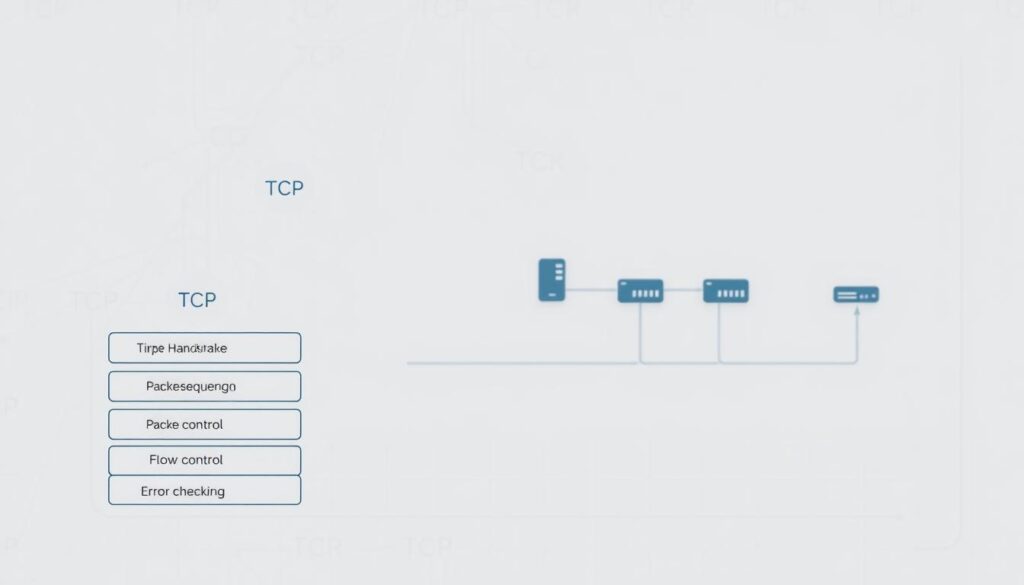
When your player prefers certainty over speed, this protocol builds a reliable, ordered pipe for every byte.
How it starts and stays reliable: A three-way handshake (SYN, SYN‑ACK, ACK) sets up the connection. Sequence numbers and acknowledgments keep packets in order. If something goes missing, retransmission fixes it so the data you request is complete.
That reliability makes this transport the backbone for web pages, file transfers, email, and HLS/DASH video segments. Your VOD watch and downloads benefit from accurate delivery and fewer visible glitches.
What to expect for live streams
Congestion control slows transfer when networks are busy so streams degrade gracefully instead of failing. That safety can add seconds of latency during live events.
- You get ordered delivery and error correction for consistent quality.
- Retransmits guard accuracy but increase delay when packets are lost.
- LL‑HLS keeps the same dependable delivery while trimming traditional delay on compatible players.
In short, choose this option when you want steady picture quality and correct data. If you need sub‑second live action, expect trade-offs between speed and reliability.
User Datagram Protocol (UDP): real-time speed and why live streaming loves it
For real-time feeds, a lightweight datagram protocol cuts delay so action feels instant.
How it works: This user datagram protocol is connectionless and uses a tiny 8-byte header plus a simple checksum. It sends packets without waiting for acknowledgments. That “fire-and-forget” approach keeps transmission fast and reduces startup delay.
Because it doesn’t guarantee ordering or delivery, some packets may arrive out of order or drop. For live video, voip, and games, a missed frame or short audio glitch is often preferable to a long stall.
Modern systems split tasks. A control protocol like tcp manages session setup while the datagram layer carries media via RTP. Reliability layers such as SRT sit on top to recover from packet loss and smooth jitter on shaky networks.
| Feature | Benefit | Common use |
|---|---|---|
| Connectionless | Lower latency, less overhead | Live video, games |
| Small header & checksums | Faster packet processing | VoIP, audio streaming |
| Supports multicast | Efficient multi-viewer delivery | Broadcast events |
- You get speed for real-time viewing where immediacy matters most.
- Checksums protect basic integrity without blocking playback.
- SRT/RIST can add lost-packet recovery when your network needs it.
IPTV UDP vs TCP: which protocol suits live sports vs on-demand video?
Your viewing habits determine whether speed or consistency should lead the delivery choice. Live sports favor immediacy; movies and series favor steady picture and few interruptions. Below is a clear guide to match protocol approaches with your needs.
Live sports and events: low-latency priorities and acceptable packet loss
When timeliness matters, live feeds typically use lightweight delivery to cut latency. That can mean a brief visual artifact instead of a several-second freeze.
Use stacks built on udp for raw speed and add SRT/RIST if packets lost on unstable links cause problems. You’ll accept small gaps to keep action feeling real-time.
Video on demand: buffer tolerance, ordered delivery, and consistent quality
For on-demand playback, choose tcp-based delivery so segments arrive in order and your movie plays smoothly. Buffering lets players retransmit missing data and maintain image fidelity.
Device and network realities: Wi‑Fi variability, packet loss, and jitter
Different devices and home networks respond differently to loss and jitter. Ethernet or 5 GHz Wi‑Fi reduces packets lost and improves reliability across applications.
- Live events → prioritize low latency and lightweight delivery.
- Movie marathons → prefer ordered, buffered delivery for consistency.
- Flaky networks → use UDP-based stacks with recovery layers or LL‑HLS on TCP.
Practical tip: providers like GetMaxTV support both paths so you can default to steady VOD and switch to low-latency live modes for big games.
Modern streaming stack in 2025: QUIC, SRT, WebRTC, and LL‑HLS in the mix
Newer transports shorten startup and tighten interactivity while still protecting picture quality.
QUIC runs over a datagram layer to cut handshake rounds and encrypts via TLS 1.3. That reduces startup time for web pages and segment delivery so your player begins faster and resumes quickly after glitches.
Reliable layers for lossy networks
SRT and RIST sit on top of a lightweight transport and add ARQ and FEC‑style recovery. They fix lost packets and smooth jitter so live video holds steady on unstable links.
Sub‑second interactions and low‑latency HTTP
WebRTC delivers sub‑second glass‑to‑glass timing for interactive audio and video sessions. LL‑HLS keeps the ordered delivery and retransmits typical of TCP while trimming live latency on supported players.
You don’t have to choose just one. Modern providers mix QUIC, recovery stacks, WebRTC, and LL‑HLS so you get low latency where it matters and strong reliability for VOD.
| Protocol/Stack | Main strength | Best use |
|---|---|---|
| QUIC | Faster handshakes, built‑in TLS | Web delivery, quick start |
| SRT / RIST | Packet recovery, jitter smoothing | Lossy networks, contribution links |
| WebRTC | Sub‑second interactivity | Calls, low‑latency live |
| LL‑HLS | TCP reliability with low latency | Live streams on compatible players |
Network conditions shape which transport performs best for your location and devices. For a deeper technical read, see this video streaming protocol guide.
Decision guide: how to choose the right protocol path for your IPTV needs

Start by matching what you watch most to the transport behavior that fits it best. This simple rule helps you pick between low delay and ordered delivery.
Assessing your use case: real-time channels, VOD libraries, or hybrid
If you watch live sports and events, prioritize speed and low latency. Many live stacks use udp-based delivery with optional recovery layers for unstable links.
If you mainly stream movies and series, favor tcp-based segment delivery for ordered data and consistent quality. Hybrid viewers should let the player switch modes by content type.
Network conditions: bandwidth, congestion, packet loss, and device support
Measure your bandwidth and watch for packet loss. Low loss and high bandwidth let you lean into low-delay modes. Flaky Wi‑Fi or high packet loss means you need recovery layers or LL‑HLS on tcp for steadier play.
- Classify your viewing: live, VOD, or hybrid.
- Map to transport: low-latency for live; ordered delivery for VOD.
- Check devices: ensure your players support low-latency modes or LL‑HLS.
- Run quick tests: short live and VOD streams before a big event.
When you need a practical next step, use this protocol choice guide to validate settings and see how GetMaxTV meets both low‑latency and reliable VOD needs with instant activation.
Optimizing your home setup for fewer drops, less buffering, and better picture
Prioritizing where devices connect and how traffic flows on your network fixes many streaming issues.
Reduce packet loss and latency: Ethernet, router QoS, and 5 GHz Wi‑Fi tips
Use Ethernet where you can. A wired link stabilizes transfer and cuts interference that causes errors. Short, high‑quality cables reduce subtle transmission problems and keep data flowing smoothly.
Enable router QoS. Give streaming and video traffic priority so other apps don’t spike your latency. QoS helps your data streams stay steady when someone else starts large uploads.
Move high‑use devices to 5 GHz Wi‑Fi for more speed and less overlap with neighboring networks. That reduces packet loss and lowers delay on busy links.
| Action | Benefit | When to use |
|---|---|---|
| Ethernet | Stable transfer, fewer drops | Gaming consoles, set‑top boxes |
| Router QoS | Prioritized streaming data | Households with many users |
| 5 GHz Wi‑Fi | Less congestion, higher speed | Living room, media rooms |
| Firmware & cables | Fewer errors, better quality | All networked devices |
- Plan channels and place access points near rooms where you watch most.
- Pick lower latency modes for live events; allow a bit more buffer for long VOD playback.
Why GetMaxTV is the best-value IPTV choice—no matter the protocol
GetMaxTV bundles massive channels and VOD so you can stop switching apps and start watching.
Massive catalog: You get over 19,000 live channels and 97,000+ movies and series in one place. That means your queue never runs dry and you can find the sports, shows, and movies you want fast.
Unbeatable price: Pay just $6.95/month with all sports and movie packages included and no hidden fees. The low cost makes it easy to try different content without stretching your budget.
Works on the devices you already own
Firestick, Smart TV, Android, Mac, Windows and more are supported with simple app setup. That broad device support keeps your living room, laptop, and phone in sync.
Fast activation and support
Instant activation in about two minutes gets you watching without long forms. There’s no contract, and 24/7 customer support helps if you need setup or troubleshooting.
- One place for everything: live channels and on‑demand video together.
- Low cost: $6.95/month with sports and movie packages included.
- Cross‑device apps: simple installation on common devices.
- Quick start: two‑minute activation and round‑the‑clock help.
- Transport flexibility: whether your viewing favors low‑latency live feeds or ordered VOD transfer, GetMaxTV supports both approaches for reliability and quality.
Ready to subscribe? Visit GetMaxTV now. Not sure yet? Try a free, no‑obligation trial via WhatsApp: start a trial on WhatsApp. For a regional channel listing and sports lineup, see this Canadian channel guide.
Conclusion
Match protocol behavior to your habits: instant action needs minimal delay, and long-form video benefits from ordered delivery.
You’ve seen the core differences: tcp shines for ordered, reliable VOD and web transfers. udp gives faster time‑to‑glass for live events, games, and real‑time audio.
Modern stacks like LL‑HLS, WebRTC, SRT and QUIC bridge those gaps. They add smarter handshakes, recovery, and encryption so you get lower latency with dependable results.
Your home network and devices matter. Use Ethernet, QoS, and 5 GHz Wi‑Fi to cut packet loss and improve picture quality.
Ready to watch? For the best value and flexibility, choose GetMaxTV: 19,000+ live channels, 97,000+ VOD, $6.95/month, instant two‑minute activation, no contract, and 24/7 support. Subscribe at watchmaxtv.com or try a free WhatsApp trial at https://wa.me/message/OZ4NORVZQTYAC1.
FAQ
What is the difference between the two main transport protocols for streaming?
One protocol focuses on guaranteed delivery and ordered packets, which helps with file downloads and on‑demand video where accuracy matters. The other prioritizes low latency and minimal overhead, letting live feeds and voice chat keep pace even if a few packets are lost. Your choice depends on whether you value real‑time responsiveness or perfect reconstruction of every frame.
How does the transport layer affect live video and VOD playback?
The transport layer decides how packets move, whether they’re re‑sent when lost, and how quickly they arrive. For live channels you want minimal buffering and delay; for VOD you can tolerate buffering to ensure smooth, ordered playback. That difference shapes viewer experience on phones, smart TVs, and set‑top devices.
Why does one protocol add latency while the other can drop packets?
The reliable protocol performs handshakes, acknowledgments, and retransmissions to ensure every packet reaches the destination in order. Those steps add delay. The connectionless protocol skips retransmit steps, so missing packets are ignored instead of delayed — reducing lag but risking brief glitches in video or audio.
When should you use a reliable, ordered protocol for streaming?
Use it for on‑demand libraries, file transfers, web video, and email where frame accuracy and ordering are essential. It’s ideal when buffering is acceptable and you prefer consistent picture quality over extreme low latency.
When is the low‑latency, connectionless protocol a better fit?
Choose it for live sports, concerts, VoIP calls, and competitive gaming where sub‑second delay matters. It pairs well with multicast, RTP/RTSP, and newer UDP‑based enhancements that tolerate some packet loss to keep streams in sync with real time.
What modern protocols should you consider beyond the basic choices?
Look at QUIC for faster secure handshakes over UDP, SRT or RIST for reliability over unstable links, and WebRTC for interactive, sub‑second sessions. Low‑latency HLS can also deliver near real‑time playback using TCP while reducing delay.
How do packet loss and jitter affect your viewing experience?
Packet loss can cause brief pixelation, audio gaps, or frozen frames. Jitter — variable packet arrival times — makes buffering spike. Reducing loss and smoothing jitter yields steadier playback, especially for live events where you can’t rely on long buffers.
What practical steps can you take at home to improve stream quality?
Use wired Ethernet when possible, enable router QoS for streaming devices, prefer 5 GHz Wi‑Fi for less interference, and close background uploads or peer‑to‑peer apps. These moves lower packet loss and latency so live and VOD streams run better on your device.
How do network conditions influence protocol choice for broadcasters?
If networks are stable with ample bandwidth, reliable ordered delivery gives consistent quality. For constrained or high‑latency networks, adding UDP‑based resilience or adaptive bitrate and lower buffers is wiser to keep live feeds watchable across varied connections.
Can one protocol handle both live sports and VOD reliably?
A hybrid approach works best: use low‑latency delivery paths or UDP‑based stacks for live sports, and TCP‑based HLS/DASH for VOD. Many modern platforms combine techniques so you get low delay for real‑time events and high accuracy for on‑demand content.